






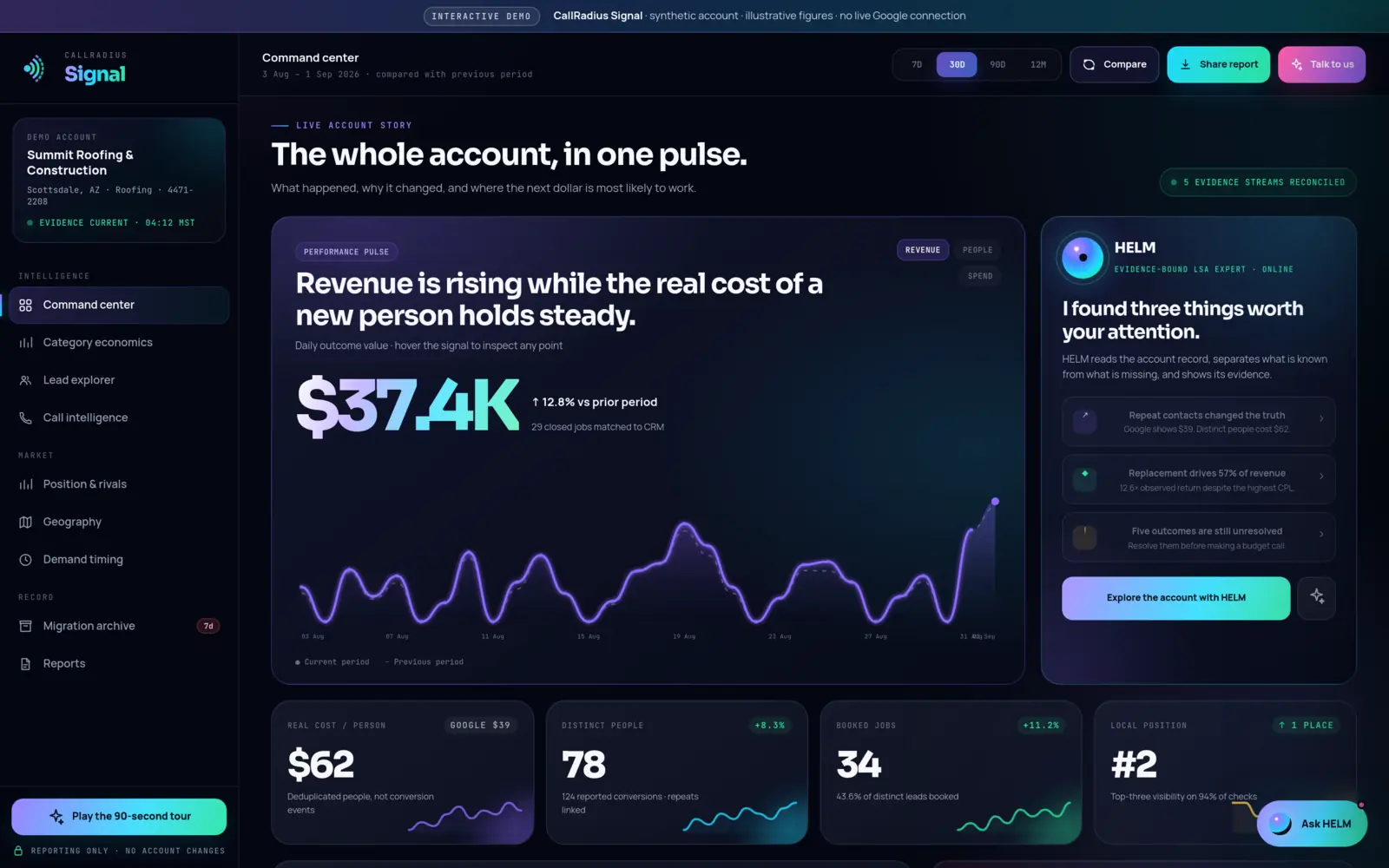

- The CallRadius Signal live demo runs on a fictional business, Summit Roofing & Construction, with synthetic figures and no live Google connection.
- Start on the command center, then follow the money: category economics, then the lead explorer.
- Every screen answers one owner question. Read the question first and the chart second.
- Look for the gaps the demo shows on purpose, like five booked jobs not yet matched to revenue.
- Signal is read-only. Nothing in the demo, or in the product, changes a Google account.
Before you click anything
Open the demo and look at the strip across the top: "synthetic account, illustrative figures, no live Google connection." Summit Roofing & Construction, a roofer in Scottsdale, doesn't exist. Its numbers were built to be internally consistent so the screens tell a coherent story, but none of them describe a real business. Every figure in this tour comes from that demo.
Two more things are worth knowing up front. The sidebar ends with "Reporting only, no account changes," which is how Signal works for real customers too: it reads and archives your Local Services data and cannot change bids, budgets, campaigns or settings. And HELM's answers in the demo are scripted from the synthetic evidence on screen. No live account or AI model is queried.
If you'd like a narrated start, the "Play the 90-second tour" button in the sidebar walks through the main screens. If you'd rather explore, here's the order we'd use.
1. Command center: is the account working?
The first screen leads with the outcome. The demo period is 3 August to 1 September 2026, compared with the previous period, and you can switch between 7, 30 and 90 days or 12 months.
What to look for:
- The two cost numbers side by side. Google's reported cost per lead is $39; the real cost per distinct person is $62. That gap comes from 124 reported conversions mapping to 78 people. We explain the arithmetic in Google says $39. The real number is $62.
- Booked jobs, not leads. 34 booked jobs, which is 43.6% of distinct leads.
- HELM's three findings. Repeat contacts change the cost picture, replacement work drives 57% of revenue, and five outcomes are still unresolved. That third card is the one to click. It tells you HELM won't treat return as settled while revenue is missing.
For a screen-by-screen reference, see Reading the command center.
2. Category economics: where does the money work?
A blended cost per lead hides the difference between a repair call and a full replacement. This screen breaks the account into service categories with leads, spend, real cost per lead, bookings, booking rate, cost per booked job, revenue and return.
In the demo, HELM's note says Roof Replacement takes 35% of spend and produces 57% of matched revenue, and that two unresolved outcomes "can change the magnitude, not the current direction." That's the habit to look for: a finding stated together with how much the missing data could move it. More in Category economics explained.
3. Lead explorer: who were these people?
This is where the summary numbers become individual records. Each row has when the lead arrived, the contact, category, area, charge state, outcome and response. Filters split charged, credited and needs-review leads, plus repeat people.
The detail worth noticing: 46 repeat events are linked to known people, and nothing is silently discarded. As the screen puts it, "Signal keeps both truths visible." If you ever doubt the $62 figure, this is where you can trace it back one person at a time.
4. Call intelligence: how are calls being handled?
Call intelligence is a Signal Pro feature. In the demo it shows a handling score of 82, broken into greeting (94), discovery (81) and next step (72), plus caller intent across 78 calls. HELM's scripted call brief points at response time: calls answered inside two minutes booked at nearly twice the rate of calls returned after ten minutes, with Friday afternoons carrying the clearest handling gap.
Look at which sub-score is lowest. In the demo it's "next step," the part of the call that should move a caller toward a booking. Signal keeps transcripts, handling analysis and recording references, not audio files. See Call intelligence explained.
5. The market screens: position, geography and timing
Position & rivals
Rival tracking is also a Pro feature. The demo account sits at #2 and was top three on 94% of checks (55 of 58). Two details matter more than the rank: the current #1 competitor added 22 reviews, and the demo business has a 4.8 rating from 211 reviews. Position is a moving field, not a trophy.
Geography
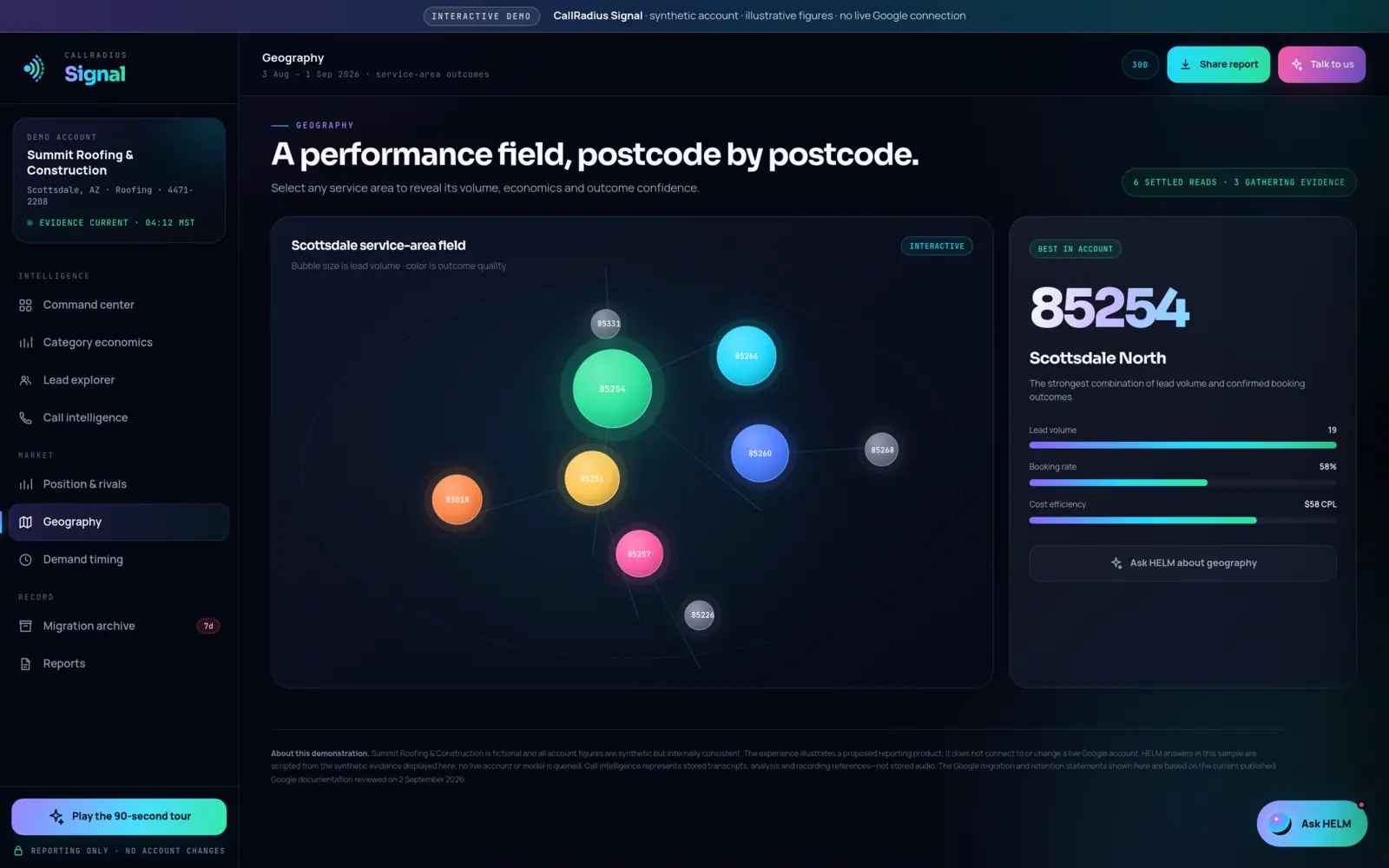
Each bubble is a postcode, sized by lead volume and colored by outcome quality. The demo's strongest area is 85254, Scottsdale North: 19 leads, a 58% booking rate and a $58 cost per lead. The label to read first is the small one above the map: "6 settled reads, 3 gathering evidence." Not every postcode has enough data to judge, and the screen says so.
Demand timing
A heatmap of 168 hourly blocks across the week, built from 12 observed weeks. We cover how to read it, and how much evidence to want before acting, in Demand has a shape. All three market screens are explained in Position, rivals, geography and timing.
6. Migration archive and reports: what do you keep?
Google keeps Local Services history for a limited period. Signal retains the reports it collects, so your history doesn't start from empty if Google's interface changes or you pause and come back. The demo's migration archive shows what that record looks like for the fictional account: 6,940 lead records, 3,318 transcripts and 37 monthly report views, with unavailable evidence identified instead of hidden.
The reports screen shows a report studio with a live preview. Its executive report opens with a one-line headline, three outcome numbers (matched revenue, booked jobs and observed return) and HELM's short read, which ends with "Resolve five unmatched outcomes before changing budget." If you're an agency, that page format is worth studying; we wrote about it in Client reports that get read. How retention and downloads work is in Your data: read-only and archived.
Ask HELM last, then decide
The "Ask HELM" button is tempting from the start. Open it after you've seen the screens. Its executive read loads the evidence it's working from (30 daily performance rows, 78 distinct leads, 34 booked outcomes and 29 revenue matches) and it names the five booked outcomes not yet matched to revenue, saying it will show that gap before answering any question that depends on return. Suggested questions like "Should I cut budget?" are a good test of that habit.
If the screens answer questions you've been asking about your own account, CallRadius Signal is $29 a month, or $79 for Pro with unlimited HELM, call intelligence and rival tracking. Enrollment is opening soon, and it will start with a 14-day trial that needs no card. You can see the plans on the Signal page or visit the Signal trial page. If you'd rather have someone run the account, read Managed or self-serve?
Questions about anything in this article? Talk to a person. We answer every message.